Requirements & Installation
A very personal point of view: I recommend to use Monodevelop over MS Visual Studio because this way you can ensure better interoperability of your code. It's true that Visual Studio is a more complete IDE and has better integration with NuGet, but someone has to put pressure to ensure a more open ecosystem in the future.
NuGet is open source, but it's not truly open because it heavily depends on Windows environments if you want to use its more interesting features (like pack).
Currently, the main ColorSharp package distributed via NuGet is compiled with the .NET 4.0 profile. So, you'll need .NET >= 4.0 (4.0, 4.5, 4.5.1, 4.5.2), or Mono >= 3.2.
Even if ColorSharp runs smoothly on Mono 3.2, this version is unsupported. This means that ColorSharp won't be tested on this Mono version, so we can't ensure that the compatibility will remain on the future. The recommended version is Mono >= 3.12.
If you use Monodevelop, the previous warning about Mono version applies here too, even more, because NuGet integration has improved a lot with the latest versions. We strongly recommend to use Monodevelop >= 5.5 .
To install the ColorSharp dependency on your project, go to the upper menu and select Project -> Add NuGet Packages..., then type ColorSharp in the search bar, select the most recent version and click the Add Package button.
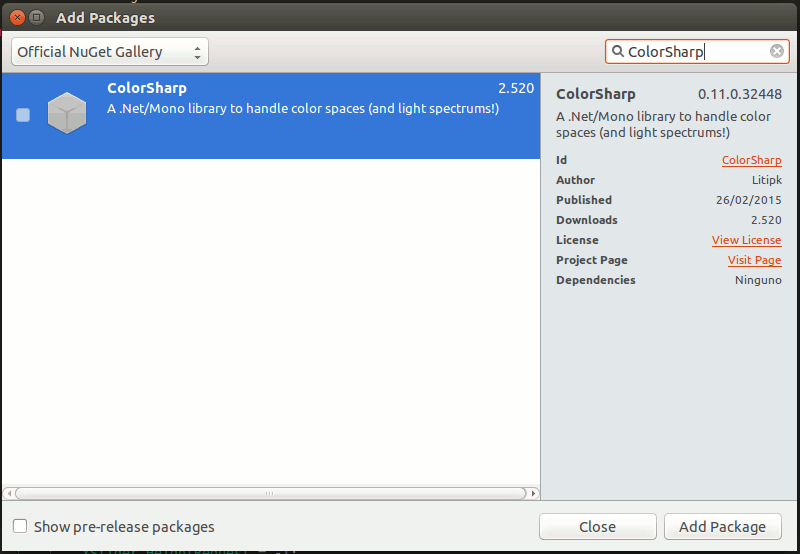
If you use the NuGet console, you can install ColorSharp typing:
Install-Package ColorSharp