
A tiny OpenCode TUI sidebar plugin that shows per-session timing — how much wall-clock the session has taken and how much of that was actually spent waiting on the model.
It renders into the same right-hand sidebar as the Quota / MCP / LSP / Todo / Files panels, reading the session's messages directly from the TUI's reactive state. Nothing is ever injected into the message stream, so there is zero context-window pollution.
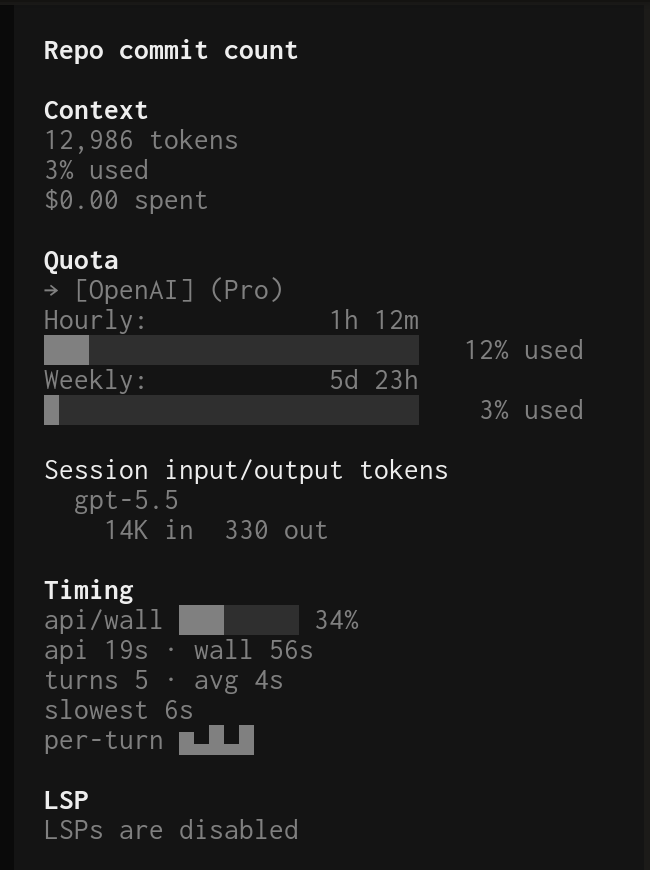
Timing
api/wall ██████░░ 78%
api 31s · wall 40s
turns 4 · avg 8s
slowest 19s
per-turn ▄█▂▂
Every row names itself, so there are no unlabeled numbers or glyphs to decode.
| Row | Meaning |
|---|---|
api/wall |
How much of wall-clock was actual model inference, as a bar gauge and percent. |
api |
Total assistant inference time — the sum of time.completed − time.created over every completed assistant message. |
wall |
Span from the first to the last message timestamp. Includes the time you spend reading/typing between turns, so api is always a fraction of it. |
turns |
Number of completed assistant messages, plus the average per-turn duration. |
slowest |
The single slowest assistant message. |
per-turn |
Sparkline of each recent turn's duration. |
The panel is always shown; before the first turn its values read zero.
Add it to the plugin array of the TUI config that OpenCode loads
(~/.config/opencode/tui.json or tui.jsonc) — this is a TUI plugin, so it
belongs in tui.json, not opencode.json:
OpenCode installs the plugin and its dependencies with Bun at startup. Restart
OpenCode and open the session sidebar to see the Timing panel.
You can also pin a version, e.g. @foae/opencode-timings@0.1.2.
Pass options using the tuple form ([spec, options]) in tui.json:
{
"$schema": "https://opencode.ai/tui.json",
"plugin": [
["@foae/opencode-timings@latest", {
"mode": "fancy",
"fields": { "ratio": true, "api": true, "wall": true, "turns": true, "avg": true, "slow": true, "sparkline": true }
}]
]
}| Option | Values | Default | Meaning |
|---|---|---|---|
mode |
"fancy" | "simple" |
"fancy" |
fancy draws the gauge bar on the api/wall row and adds the per-turn sparkline; simple is the same rows without the bar or sparkline. |
fields |
object of booleans | all true |
Each toggles exactly one value: ratio (the api/wall gauge + percent), api, wall, turns, avg, slow, sparkline (sparkline is fancy-only). Values that share a line drop out individually. |
With no options (a plain "@foae/opencode-timings@latest" string), it defaults to fancy mode with all fields shown.
- OpenCode
1.15.xor newer (uses the TUI slot plugin API).
Built and run with Bun. The package ships raw source — there is no build step; OpenCode loads src/tui.tsx directly.
src/timing.ts— pure timing math, formatting, and config parsing (no JSX), unit-tested.src/tui.tsx— the SolidJS sidebar component and the slot registration.
bun install
bun run typecheck # tsc --noEmit
bun test # unit tests for the pure logic in src/timing.tsopentui, solid-js, and the OpenCode plugin/SDK are peer dependencies — at runtime they come from the OpenCode host so the plugin shares its renderer; the devDependencies mirror them for local typecheck and tests.
MIT — see LICENSE.
{
  "$schema": "https://opencode.ai/tui.json",
  "plugin": ["@foae/opencode-timings@latest"]
}